
Introduction about Deleted Message Monitoring App
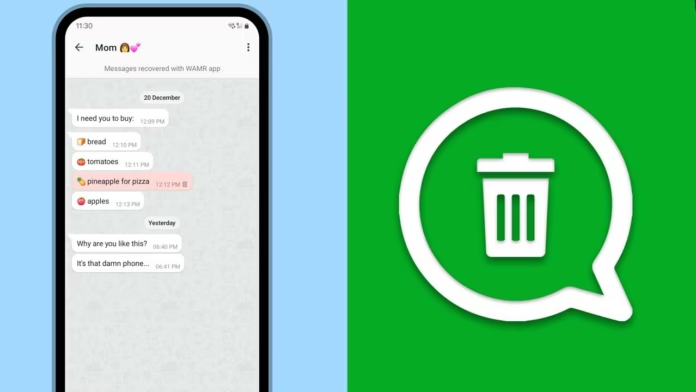
There is always a moment when a notification appears, you look at it, and before you open the chat, it disappears. It is not changed or replaced, but simply deleted. The curiosity that comes after is not always about the message itself, but about why it was removed. That short gap between receiving and losing a message is where tools like WAMR: Reveal Deleted Messages start to feel useful.
The Curiosity Around Deleted Messages Isn’t Accidental
Deleted messages get attention in a way normal messages usually do not. A regular text may be easy to ignore, but once it is removed, it suddenly feels more important. This reaction is not always about the message content; it is more about the interruption it creates. People want to know what was written because it was hidden, not always because it was urgent.
WAMR does not break into chats or recover messages from servers. Instead, it works by saving information when it first appears as a notification. This means the app is more about observation than true recovery, and that is what defines how it actually works.
A Different Approach to Message Recovery
Unlike what many people think, the app does not pull deleted messages back from messaging platforms. It depends completely on your phone’s notification system. When a message arrives, your phone shows it for a short moment, and WAMR records that notification and saves it.
This means the app is not directly opening or reading your chats. It only stores what your device has already displayed. So when the sender deletes the message later, the saved notification works like a reference, making it seem as if the deleted message has been recovered.
Setting Up Reveals the Core Mechanism
The setup process itself shows how the app really works. It asks for notification access so it can read incoming alerts. Without this permission, the app cannot work at all because it depends on the messages your phone displays through notifications.
During use, it becomes clear that this permission is necessary, not optional. If notifications are delayed, muted, or limited by your phone settings, WAMR can miss those messages completely. This means the app’s performance is directly connected to how your phone manages notifications.
The First Few Days of Use Feel Subtle
At first, nothing feels different. Messages arrive and disappear as they normally do, while the app quietly saves them in the background. You may not even think about it until someone deletes a message.
When that happens, WAMR shows what was originally received. The result feels quick, almost as if the message was never deleted. This is where the app begins to feel useful, even though it is only showing saved notification data.
Text Messages Work More Reliably Than Media
One of the first things you notice is the difference between text and media recovery. Text messages are usually captured correctly because they often appear clearly in notifications. Media files work differently. If an image or video has not fully downloaded, the notification may only show a basic placeholder.
In that case, WAMR can only save incomplete information, which limits what it can show later. This makes it clear that the app handles text more reliably than media, because media recovery depends on whether the file was available through the notification at the right time.
Timing Becomes an Invisible Factor
As you keep using the app, timing becomes more important. Messages that remain in notifications for a little while are usually saved properly. But if someone deletes a message too quickly, WAMR may only capture part of it or miss it completely.
The app does not make this point very obvious, but it becomes clear with regular use. How fast a sender deletes a message can directly decide whether you will be able to view it later or not.
The App Works Quietly in the Background
One noticeable thing about the app is that it does not need much interaction. After the setup is complete, you do not have to keep opening it or managing it again and again. It works quietly in the background, saving and organizing incoming notification data.
This passive style makes it easy to forget that the app is even running. Still, it keeps building a record of received messages, creating a secondary message history alongside your regular messaging apps.
Where It Feels Genuinely Useful
The app becomes most useful when messages are deleted soon after being sent. This often happens in group chats, where conversations move quickly and messages can disappear before you even open them.
Instead of guessing what was removed, you can check the app and view it directly. It reduces uncertainty, especially when the deleted message looked important or unusual. In some cases, it also helps save information that was shared for a short time and then removed, making the app feel more like a backup tool than just something used out of curiosity.
Situations Where It Doesn’t Work as Expected
Despite being useful, the app has clear limits. If notifications are turned off, incoming messages will not be recorded. Muted or restricted chats may also fail to trigger the app, so those messages can be missed.
Sometimes, system-level restrictions can also limit background activity, causing the app to miss certain notifications. These gaps are not really app errors. They are natural results of how the app depends on your phone’s notification behavior.
Storage Builds Up Over Time
Another detail you notice with regular use is how much data the app collects over time. Every saved message is stored locally, and as days pass, that record can become larger.
This is helpful if you want a longer message history, but it also means the app may slowly use more storage space. Managing or clearing this saved data becomes part of using the app, even though most users may not think about it at the start.
Privacy Feels Different When Notifications Are Involved
Granting notification access changes the way the app works with your phone. It lets the app read incoming message previews, which is necessary for saving deleted messages later.
This does not mean the app breaks encryption or directly enters your private chats. Instead, it depends on the sensitive information your phone already shows in notifications. Understanding this difference is important for anyone who uses the app regularly.
How It Changes Your Messaging Experience
After using the app for a while, your reaction to deleted messages starts to change. The curiosity that usually comes after a message is removed becomes weaker because the information no longer feels completely hidden.
At the same time, it helps you understand how these tools really work. Messages are not recovered after deletion; they are saved before they disappear. That small difference changes how the app feels. It is not exactly a recovery tool, but more like something that quietly watches and remembers what might otherwise be lost.
Read this post
- Online Voter Verification and Electoral Data Access with ECINET App
- Transforming Smartphones into Cinematic Tools with a Pro-Level Camera App


