
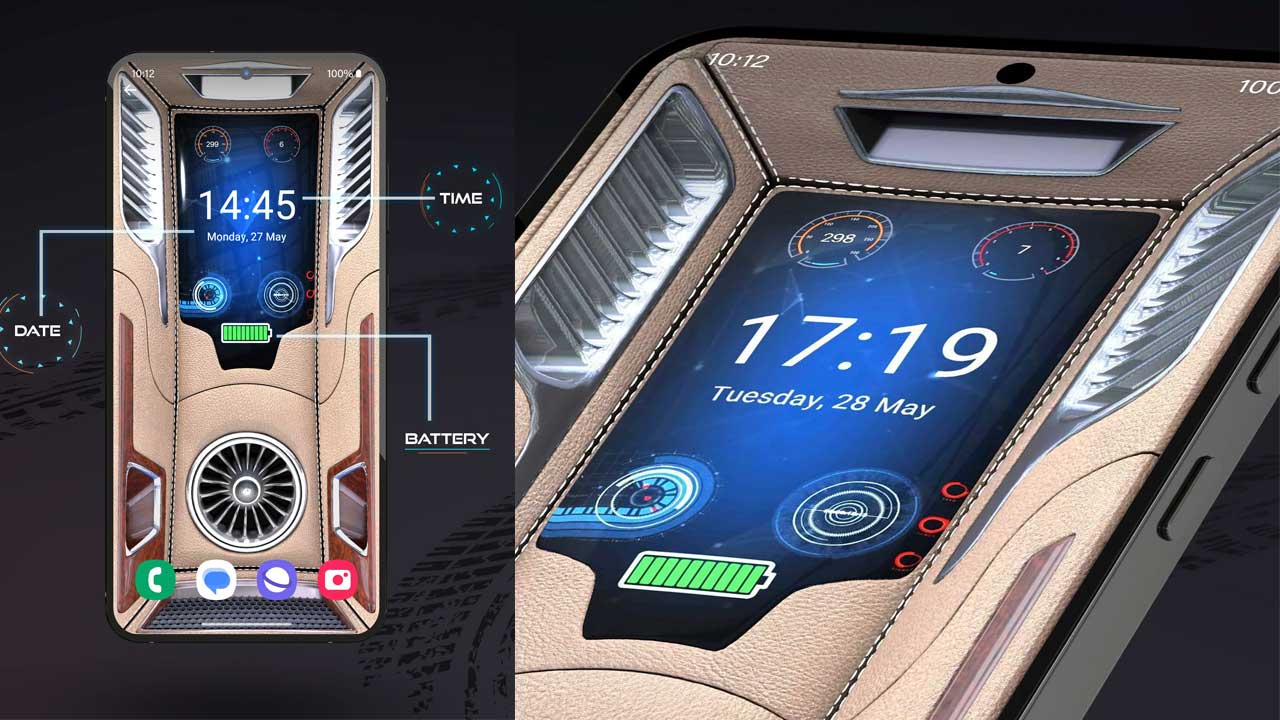
Introduction about 3D Wallpaper Clock Widget App
Time no longer needs to remain a static element in the corner of your screen. With the 3D Wallpaper Clock Widget HD app, it transforms into a dynamic visual experience that moves, glows, and adds a sense of depth to your display. Instead of a simple flat digital clock, users are presented with a high-definition layered interface that feels immersive and visually appealing. The app reimagines ordinary home and lock screens, turning them into creative digital spaces where time is not just displayed—but truly experienced.
The Core Idea Behind the App
The 3D Wallpaper Clock Widget HD app is built around the idea of blending customization with simplicity, without overcomplicating the user experience. While many clock applications prioritize functionality alone, this one also emphasizes thoughtful design and visual psychology. It ensures that the time remains clear and easy to read while still delivering an attractive, modern look. This balanced approach makes it ideal for users who want both everyday practicality and a visually refined aesthetic on their devices.
Depth-Oriented Design Philosophy
One of the most notable features of the app is its focus on 3D visuals that add real depth to the screen experience. Instead of plain, static backgrounds, it uses layered animations, dynamic lighting, and subtle perspective effects that make the clock feel like it is floating above the wallpaper. This design style delivers a premium, modern look even on mid-range devices, improving the overall visual experience while keeping the interface clean and user-friendly.
Seamless Visual Harmony with Wallpapers
The developers have clearly prioritized visual harmony, ensuring that each clock style blends naturally with a wide range of wallpaper themes instead of appearing as a separate or disconnected overlay. Whether the background is abstract, nature-inspired, or futuristic, the clock widget adapts smoothly to complement the overall design. This thoughtful integration helps maintain a clean, cohesive appearance, making the phone interface feel intentionally designed rather than cluttered with mismatched elements.
Advanced Customization Experience
Personalization is one of the strongest features of the app, offering far more than basic color adjustments. Users can fine-tune elements such as clock size, font styles, animation speed, and glow intensity to suit their individual preferences. This high level of customization ensures that each device screen feels unique, allowing users to reflect their personal style and creativity through their display setup.
Variety of Themes and Clock Styles
Another standout feature of the app is its wide range of clock formats and theme options designed to match different moods and occasions. Users can switch between minimal digital styles and more expressive neon-inspired 3D designs, depending on their preference. This versatility allows the app to appeal to both subtle design lovers and those who prefer bold, vibrant visuals. As a result, it becomes a flexible choice for users who like to frequently refresh and personalize their phone’s appearance.
Smooth Performance and Resource Optimization
Despite its visually rich interface, the 3D Wallpaper Clock Widget HD app is built with a strong focus on performance efficiency. While many users worry that animated wallpapers can slow down devices or drain battery life, this app uses optimized rendering methods to ensure smooth and stable performance. Its animations are carefully fine-tuned to provide depth and visual appeal without causing noticeable lag or unnecessary power consumption, keeping the experience both beautiful and efficient.
User-Friendly Interface and Navigation
The app interface is designed to be highly intuitive, making it easy to use even for those who are not very tech-savvy. Its setup process is simple and quick, allowing users to apply wallpapers and widgets in just a few taps. The menu structure is clean and well-organized, with clearly labeled options that make navigation through customization settings straightforward and free from confusion or unnecessary complexity.
Real-Time Preview and Control
Another thoughtful feature of the app is its real-time preview option, which lets users instantly see how changes will look before applying them to their screen. This interactive functionality removes guesswork and makes it easier to fine-tune design choices with precision. It also enhances user confidence and satisfaction during the customization process, while encouraging experimentation with different styles and layouts.
Compatibility Across Different Devices
The app is built to perform smoothly across a wide range of screen sizes and resolutions, including HD and Full HD displays. This ensures that its 3D effects stay sharp, clear, and visually consistent on different devices. With high-resolution textures and carefully refined animations, it delivers a premium visual experience that elevates the overall look and feel of the phone’s interface.
Emotional Aesthetic and Personal Atmosphere
A distinctive strength of the 3D Wallpaper Clock Widget HD app is its ability to shape the emotional atmosphere of a device’s interface. Dark, glowing themes can create a futuristic and high-tech vibe, while soft gradients combined with refined typography produce a more calm and relaxing visual experience. This level of emotional customization goes beyond simple functionality, making the app feel less like a basic utility and more like a tool for personal expression and mood-based design.
Long-Term Appeal and Digital Identity
A distinctive strength of the 3D Wallpaper Clock Widget HD app is its ability to shape the emotional atmosphere of a device’s interface. Dark, glowing themes can create a futuristic and high-tech vibe, while soft gradients combined with refined typography produce a more calm and relaxing visual experience. This level of emotional customization goes beyond simple functionality, making the app feel less like a basic utility and more like a tool for personal expression and mood-based design.
Relted to this post : EaseMyTrip App Guide


