
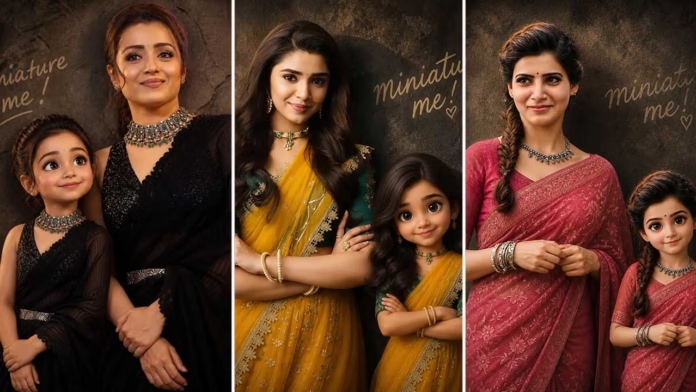
Introduction about TinyVerse Portraits
The most eye-catching AI portraits today are not always the ones with fantasy castles or glowing space backgrounds. The images getting real attention on social media are the personal ones, where realistic details mix naturally with imagination. A small miniature version of a person standing next to their adult self creates a touching and creative effect that feels fun, cinematic, and surprisingly human. This is what makes this AI image prompt so powerful when used in professional AI image-generation apps.
Why This Prompt Feels Cinematic Instead of Artificial
Most AI-generated portraits do not look good because they add too many unwanted effects to the scene. This prompt takes a different approach by focusing on clean and controlled realism. The dark textured wall adds depth without taking attention away from the main subjects, while the handwritten “miniature me!” text gives the image a personal and natural touch. The difference between the adult woman and her miniature version creates a clear story without needing extra props or heavy background details.
The matching white full-hand T-shirts and blue jeans help the portrait look balanced and well-planned. AI image apps usually give better results when the clothing is simple and the same on both subjects. Since both versions wear identical outfits, the final image feels professionally styled instead of randomly generated. The black bindi and smartwatch also make the portrait feel more realistic by adding small cultural and lifestyle details that AI tools can understand clearly.
Choosing the Right Pro AI App Matters
Professional AI apps can create very different results, even when you use the same prompt. Apps made for cinematic-style images usually handle lighting, depth of field, and skin texture much better. This matters because ultra-realistic skin details and a soft background blur are important parts of this prompt. Free tools may make the face look flat or blur the miniature character in an unnatural way, while advanced AI apps keep the facial shape and lighting balanced between both subjects.
Portrait framing is another key detail. Since the prompt uses a vertical ratio, professional AI apps can shape the image better for mobile screens. This helps create a clean, social-media-ready portrait where both subjects stay centered and easy to notice. The cinematic look does not come only from realism; it also comes from the way the frame naturally guides the viewer’s attention.
The Miniature Character Creates Emotional Contrast
The child-sized version is more than just a smaller copy of the same person. Its cartoon-like face and large expressive eyes give the portrait a softer and more innocent feeling without making it look too childish. This kind of balance is not easy for AI tools to create unless the prompt clearly tells the system how to mix realism with stylized features. Here, the adult figure remains photorealistic, while the miniature version has slightly animated facial proportions.
This difference creates a stronger visual identity in the portrait. People can instantly tell that both figures are connected, but they also feel two different emotional moods within the same image. That is one reason these kinds of prompts perform so well on visual platforms. Images with emotional contrast usually hold attention longer because viewers see them as a form of storytelling, not just simple decoration.
Lighting Is the Hidden Strength of the Prompt
Warm, soft lighting is one of the most important parts of the whole prompt. Many people do not realize how much lighting affects the quality of an AI-generated image. Strong or harsh lighting can make flaws more visible, while soft cinematic lighting blends skin textures more naturally and makes the portrait look more realistic. It also helps the dark wall in the background look rich and deep instead of plain or empty.
Professional AI apps often read warm lighting as a studio-style photography setup. This usually improves the shadows, skin tones, and clothing details in the final image. The white sneakers and white shirts benefit even more because soft lighting helps keep them bright without washing out the details. If the lighting is not described properly, AI tools often make bright clothes lose their texture and clarity.
Why the Hands-in-Pockets Pose Works So Well
Poses play a big role in making an AI portrait look natural instead of forced. A hands-in-pockets pose works well because it helps reduce awkward hand generation, which is still a common issue in many AI models. More importantly, it gives the subject a calm and relaxed body language that fits well with the gentle smile described in the prompt.
Leaning against the textured wall also makes the portrait feel more realistic by showing a natural connection with the surroundings. AI portraits usually look more believable when the subjects interact with the environment around them. Instead of looking like they are floating or added artificially, the characters appear grounded in a real studio setting.
Studio Quality Depends on Texture Details
The phrase “ultra-realistic skin texture” matters more than many people think. Professional AI apps use texture-related instructions to decide how much detail should appear in the skin, hair, fabric, and facial shadows. This helps avoid the overly smooth, plastic-like look that is often seen in lower-quality AI portraits.
The denim jeans also benefit a lot from strong texture rendering. Blue denim naturally shows folds, lines, and shading, which help create a better sense of depth in the image. When this is combined with a shallow depth of field, the final result looks more like a professionally shot fashion portrait than a typical AI-generated image.
Handwritten Text Adds Human Personality
The handwritten “miniature me!” text may seem like a small detail, but it completely changes the emotional tone of the image. AI-generated portraits can sometimes look too perfect, which makes them feel less personal. A handwritten touch breaks that polished look and adds a natural, spontaneous feeling.
This type of text also makes the image feel more suitable for social media rather than looking like a commercial design. It feels like something a real creator would add while editing, making the final portrait more personal and relatable. This small touch of realism can often increase audience engagement more than heavy visual effects.
The Vertical Ratio Is Designed for Modern Viewing
The vertical composition is more than just a layout choice. Most people view visual content on mobile phones, where vertical images naturally get more attention. AI apps trained on social-media style usually understand this type of framing very well, especially when creating cinematic portraits.
A vertical frame also improves the side-by-side arrangement of the woman and her miniature version. It gives both subjects equal visual importance while still leaving enough background space to keep the cinematic mood. A horizontal frame would make that connection feel weaker and reduce the emotional impact of the image.
AI Prompt Used for Creating the Portrait
Create a cinematic portrait of the girl alongside her miniature version. They stand side by side against a textured dark wall, with the handwritten text “miniature me!” in the background. Both wear matching dresses and have their hands folded. The woman leans gently with a soft smile, while the child has a cartoon-style face with large expressive eyes. Use ultra-realistic skin texture, warm soft lighting, shallow depth of field, sharp focus, and studio-quality detail.
Small Accessories Improve AI Recognition
The smartwatch and black bindi may seem like small details, but they help the AI build a clearer character identity. Accessories act as visual anchors, making the portrait feel more realistic and less generic. Professional AI apps often understand these details as signs of a real, lived-in character rather than just a randomly created face.
The smartwatch also gives the portrait a modern touch. Without it, the image might feel too stylized or timeless. With it, the scene looks more current and believable, which helps viewers connect with the image more easily.
Creating this image prompt is not about making fantasy art. It is about mixing realism, emotion, and stylized identity into one cinematic frame. When used in professional AI apps, the prompt becomes more than simple instructions. It turns into a controlled visual story where lighting, texture, clothing, pose, and emotional contrast work together naturally. This balance is what makes the final portrait feel memorable instead of just artificially impressive.


