
Most people don’t pay attention to their WiFi until the connection drops, videos start buffering, or online meetings begin lagging. In those frustrating moments, the WiFi Router Manager: Scan WiFi app works quietly in the background to make things easier. Rather than overwhelming users with complex technical details, the app acts like a smart guide, transforming hidden network activity into clear insights that users can easily understand, manage, and control with confidence.
Understanding What the App Really Does
At its core, the WiFi Router Manager: Scan WiFi app is designed to give users a clear view of what is happening within their wireless network in real time. It detects nearby WiFi signals, identifies connected devices, and organizes network information in a simple, user-friendly format that does not require technical expertise. By removing the confusion surrounding routers and connectivity, the app helps users understand signal strength, spot interference issues, and see which devices are using the most bandwidth.
Why Network Visibility Matters Today
Modern homes depend on WiFi for everything from remote work and online learning to entertainment and smart security systems, making network visibility just as important as connection speed. When users cannot identify what is connected to their router, network issues often seem unpredictable and difficult to manage. The WiFi Router Manager: Scan WiFi app brings transparency back by helping users detect unauthorized connections, identify overloaded devices, and locate weak signal areas. Instead of reacting only when problems occur, users can manage and optimize their WiFi network with greater awareness and control.
Device Monitoring and Network Awareness
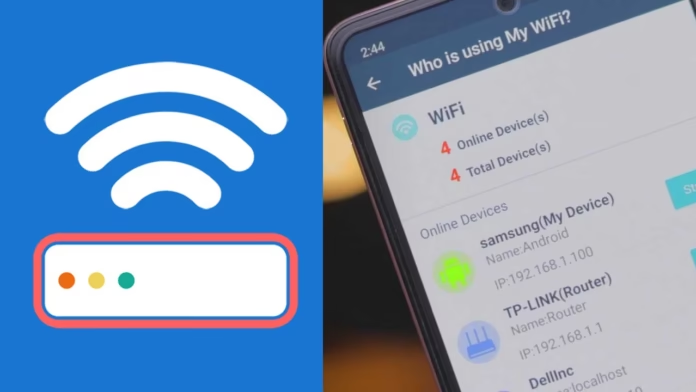
One of the app’s most useful features is its ability to display all connected devices in a simple and easy-to-read interface. From smartphones and laptops to smart TVs and unfamiliar devices, everything connected to the network is shown clearly, allowing users to understand how their internet connection is being used. This level of visibility not only helps improve network performance and bandwidth management but also encourages better digital awareness and security for both homes and small offices.
WiFi Scanning and Signal Analysis
The app’s scanning capability does more than simply detect networks—it provides deeper insight into WiFi signal behavior and performance. By examining factors such as channel usage, signal strength, and network congestion, the app helps users understand why connection quality may vary between rooms or during certain times of the day. These insights make it easier to optimize router placement, choose better channels, and use WiFi extenders more effectively, especially in densely populated areas where multiple wireless networks constantly compete for signal space.
Security Insights Without Technical Complexity
Network security can often feel complex and intimidating, but the WiFi Router Manager: Scan WiFi app simplifies it through clear and practical insights. The app identifies open networks, displays encryption methods, and detects unusual device activity in a way that is easy for everyday users to understand. Rather than pressuring users with technical jargon or complicated decisions, it promotes smarter and more informed choices, helping reduce risks such as unauthorized access, weak passwords, and outdated security settings through awareness and visibility instead of fear.
Performance Optimization for Everyday Users
The app quietly contributes to a smoother and more reliable internet experience by helping users understand how their bandwidth is being used in real time. By identifying which devices are actively consuming network resources, users can make better decisions about streaming, downloading, and online gaming activities. This becomes especially valuable in homes and shared environments where multiple users rely on the same connection, turning network performance management into a more balanced and organized process instead of a source of ongoing frustration.
Router Interaction and Practical Control
Although the app is not a replacement for router firmware, it works alongside it by making essential network controls easier to access and manage. For compatible routers, users can quickly open configuration settings, restart devices, and monitor connection status without navigating complicated menus. This added convenience saves time and allows users to handle basic network adjustments on their own, reducing the need to rely on technicians or internet service providers for minor issues.
Value for Small Businesses and Home Offices
For small businesses and home offices, the app functions as a practical and lightweight network management tool. It helps maintain reliable connectivity for video conferences, cloud-based applications, and client communication by detecting potential network issues before they become major disruptions. Without the need for costly hardware upgrades or dedicated IT support, remote workers and entrepreneurs gain valuable insight into their network performance, helping improve productivity, stability, and overall professional efficiency.
User Experience and Interface Design
One of the key reasons the app appeals to such a broad audience is its user-friendly design approach. Network information is presented in a clear, visual, and organized manner, making it easy to understand without overwhelming users with technical complexity. At the same time, the app still provides advanced insights and detailed metrics for those who want deeper control and analysis. This balanced experience allows beginners to navigate the app with confidence while giving experienced users access to the powerful tools they expect.
The Broader Role of Smart WiFi Management
As homes become increasingly smart and internet reliance continues to grow, effective WiFi management is becoming essential rather than optional. The WiFi Router Manager: Scan WiFi app aligns with this shift by giving users greater control over their digital environment. Instead of simply reacting to slow speeds or unexpected disconnections, users gain the visibility and understanding needed to keep their network stable, secure, and well-optimized for today’s connected lifestyle.


